

CapCut has become one of the most popular video editing apps in 2025. Millions of creators, influencers, and businesses use it daily. Its mix of simple editing tools and advanced features makes it stand out in a crowded market.
But when starting, many users wonder: Should I stick with the free version, or pay for CapCut Pro? Both options look appealing, but they serve different needs. This guide will help you understand the differences so you can make the right choice.
What is CapCut?
CapCut is a video editing app developed by ByteDance, the same company behind TikTok. It’s designed to be user-friendly while still offering professional-grade tools. Available on mobile, desktop, and the web, it gives creators flexibility across devices.
The app has grown rapidly because it combines essential features with AI-powered tools. From trimming clips to generating captions or adding trending effects, CapCut makes editing accessible to everyone. Both beginners and professionals use it for personal projects, social media videos, and branded content.
CapCut Free Version
The free version of CapCut is packed with features that cover most basic editing needs. You can cut, merge, and trim videos with ease. It also includes filters, basic transitions, and a library of free sound effects and music.
CapCut Free lets you export videos without a watermark, which is rare for free editors. You also get access to some templates, auto captions, and simple AI features like background removal. For casual editing, it’s more than enough.
The main limitations of the free version are tied to advanced tools and premium assets. You don’t get the full stock library of effects, music, or templates. Some AI-powered features like advanced auto-captioning, background generators, and premium cloud storage are reserved for Pro users.
CapCut Pro Version
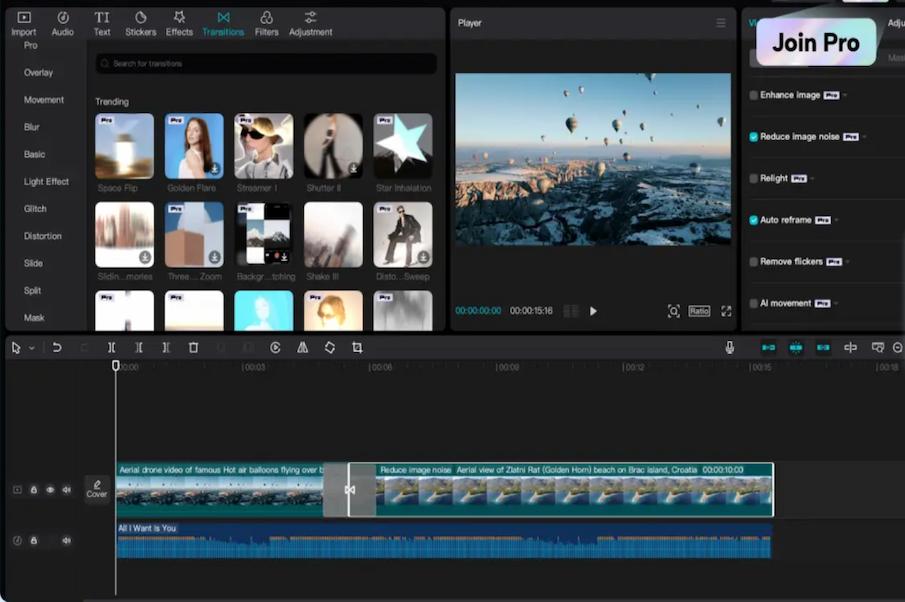
CapCut Pro is the premium subscription plan for users who need more advanced tools. It removes almost all restrictions and unlocks exclusive features. Pricing in 2025 usually ranges from $7.99 per month or $74.99 per year, depending on your region.
With Pro, you gain access to a massive library of premium stock assets. This includes high-quality music tracks, stock videos, special effects, and templates. You also get more advanced AI tools like script-to-video, enhanced background remover, and voice-to-text with better accuracy.
CapCut Pro also offers larger cloud storage and cross-device syncing. This is useful for creators who edit across desktop, tablet, and mobile. For professionals managing heavy video projects, these upgrades save time and improve workflow.
Key Differences: Free vs. Pro
CapCut Free and Pro share the same foundation, but their capabilities differ in important ways. The differences mainly revolve around advanced editing, content libraries, and storage.
Export Quality and Watermark
Both Free and Pro allow exporting without a watermark, which is a major advantage. However, Pro gives you access to higher-quality export options, including advanced HDR and smoother rendering for large projects.
Advanced Editing Tools
Free CapCut includes trimming, filters, text, and transitions. Pro adds advanced effects like motion blur, cinematic filters, 3D effects, and professional transitions. It also unlocks powerful AI tools like script-to-video and AI image generators.
Stock Assets
The free version includes a limited set of sound effects, background music, and templates. CapCut Pro unlocks the full stock library with thousands of premium tracks, stock footage, stickers, and templates. This is a huge advantage for creators who post daily.
AI-Powered Features
Free users get access to basic auto-captioning and background removal. Pro offers more advanced AI support. This includes better speech recognition, AI background generator, advanced green screen, and improved auto-caption translations.
Cloud Storage and Syncing
Free CapCut offers minimal cloud space for storing projects. Pro comes with expanded cloud storage and smooth syncing across multiple devices. For professionals who switch between desktop and mobile, this feature is extremely useful.
Side-by-Side Comparison Table
| Feature | CapCut Free | CapCut Pro |
|---|---|---|
| Cost | Free forever | $7.99/month or $74.99/year |
| Export Quality | High-quality export, no watermark | HDR export, advanced rendering |
| Editing Tools | Basic cut, trim, filters, text, captions | Pro effects, motion blur, cinematic filters, 3D effects |
| Stock Assets | Limited sounds, effects, and templates | Full premium library of music, stock videos, templates |
| AI Features | Basic captions, simple background removal | Script-to-video, AI generator, advanced captions, green screen |
| Cloud Storage | Limited | Expanded cloud storage with cross-device sync |
| Templates | Free templates only | Premium exclusive templates |
Which Version Should You Choose?
The choice between CapCut Free and Pro depends on your needs as a creator. Both versions are excellent, but they suit different types of users.
Casual Users
If you make occasional videos for TikTok, Instagram, or YouTube Shorts, the free version is enough. It covers all basic editing and gives you watermark-free exports.
Content Creators
For serious creators posting daily, CapCut Pro is a better choice. The premium stock assets, advanced effects, and expanded AI tools make editing faster and more professional. It also saves money compared to buying separate stock libraries.
Businesses and Marketers
If you manage social media for brands or produce marketing videos, CapCut Pro is essential. The advanced features, premium templates, and extra storage give you an edge. It ensures your content looks polished and stands out in competitive niches.
Pros and Cons of Each
CapCut Free
Pros:
- Free forever
- No watermark on exports
- User-friendly interface
- Good for casual editing
Cons:
- Limited stock assets
- Basic AI tools only
- Restricted cloud storage
- Missing advanced effects
CapCut Pro
Pros:
- Full access to premium assets
- Advanced AI-powered tools
- Expanded cloud storage
- Professional effects and filters
Cons:
- Paid subscription
- Some features may be overkill for casual users
- Requires ongoing payment to keep access
Tips to Get the Most Out of CapCut Free
If you’re sticking with the free version, you can still maximize its value. Here are a few tips:
- Plan your edits. Batch your work so you don’t waste time switching between projects.
- Use external resources. Free stock sites like Pixabay or Unsplash can complement CapCut’s limited library.
- Combine tools. Use CapCut Free for core editing, and pair it with other free apps for effects or audio.
- Leverage templates. Even free templates save time and help create trendy, shareable content.
- Experiment with AI basics. Auto-captioning and background removal are simple but powerful tools to boost your videos.
Frequently Asked Questions (FAQs)
Is CapCut Free forever?
Yes, CapCut Free is available forever with no hidden charges. However, it has limited features compared to Pro.
Does CapCut Pro remove watermark?
Yes, and so does the free version. Unlike many apps, CapCut allows watermark-free exports even without Pro.
How much does CapCut Pro cost in 2025?
CapCut Pro typically costs $7.99 per month or $74.99 per year. Prices may vary slightly by region.
Can I switch from Free to Pro anytime?
Yes, you can upgrade to Pro whenever you need. Once subscribed, you immediately unlock all premium features.
Is CapCut Pro worth it?
If you create content regularly, yes. The premium stock assets, AI tools, and storage make Pro worth the investment. For casual users, the free version is usually enough.
Conclusion
CapCut has redefined what video editing apps can offer. The free version is powerful and perfect for casual creators. It provides watermark-free exports, essential tools, and a simple editing experience.
CapCut Pro takes things further. With premium assets, advanced AI features, and expanded cloud storage, it is built for professionals, content creators, and businesses. The subscription price is affordable compared to traditional editing suites.
In the end, the choice depends on your goals. If you only need occasional edits, CapCut Free is more than enough. But if you want professional-grade videos, faster workflows, and access to a premium library, CapCut Pro is the smarter choice in 2025.
![🎓 Get 1 Month FREE Skillshare + 50% OFF for 1 Year! [Limited Offer]](https://sastatools.com/wp-content/uploads/2025/05/ChatGPT-Image-May-23-2025-02_16_43-PM-1024x683.png)